
Photo: Brooke Cagle / Unsplash
Claude
How to give Claude a phone number (so it can call for you)
I built AI Bot Phone because I kept wanting Claude to “just call someone” — the restaurant, the clinic desk, the shop — and Claude couldn’t. Voice mode is useful. It is not a phone line.
I built AI Bot Phone because I kept wanting Claude to “just call someone” — the restaurant, the clinic desk, the shop — and Claude couldn’t. Voice mode is useful. It is not a phone line.
This post is the plain version of how that gap closes: Claude gets its own number, places a real outbound call for you, and brings back a summary. No new mobile app. You stay in the Claude client you already use.
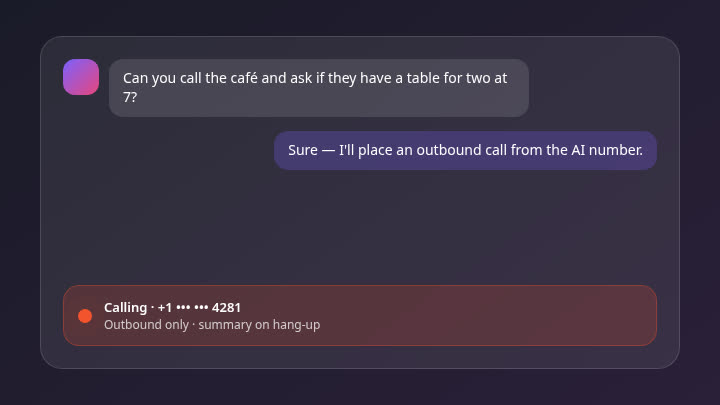 Chat request becomes an outbound call with a summary
If you want the short setup path later, the walkthrough lives on Claude phone setup. The idea below matters more than the clicks.
Claude’s voice mode is not a phone call
Anthropic’s voice mode lets you talk to Claude. Audio goes in, text goes through the model, audio comes back. That conversation stays inside the Claude session. It does not register a number on the public phone network. It does not dial a dentist in another city. It does not leave a voicemail at a shop that only answers landlines.
People mix these up for a fair reason: both involve speaking. Telephony is different. A real call needs a number the other party can see (or at least receive), a carrier path, and someone or something on the far end who picks up. Claude alone has none of that.
So when someone asks “can Claude make phone calls?”, the honest answer is: not by itself. You connect calling tools. With Model Context Protocol (MCP), that connection can be a phone server your Claude client already knows how to talk to.
What “giving Claude a number” actually means
You are not handing Claude your personal mobile. You pick a country in a country picker and assign Claude’s own number for outbound use. When the call goes out, that is the line that rings the other side.
Think of it like giving an assistant a desk phone at the office — not cloning your pocket phone. The assistant can place calls you asked for. You still decide the task. You still read what happened.
On AI Bot Phone the shape is:
- Sign up on the web.
- Choose a country for the number.
- Connect the phone MCP to Claude (custom connector / MCP settings — details on the Claude phone page).
- Ask Claude, in normal language, to place a call.
- Read the summary when the call ends. Approve follow-ups if you want them.
This product is built around outbound calls you initiate through the AI. It does not answer calls that people place to that number.
Pricing, for clarity: $9 for the first month, then $19/month. There is no separate “phone app” to install.
What you need before the first call
A few boring prerequisites save a messy first attempt.
A Claude setup that can use MCP. Desktop or a client that accepts connectors. If your Claude surface cannot add tools yet, wait until it can — there is nothing to “install as an app” on the side.
An AI Bot Phone account with a number country chosen. The number belongs to the AI line, not to a marketing claim about how many countries exist. Pick the country that makes sense for the people you will call.
A clear task. “Call +44 ••• ••• ••91 and ask whether they have the blue ceramic mug in stock before Saturday” beats “sort my life.” Claude is good at following a brief. It is not psychic about which branch you meant.
Permission to spend a call. Outbound minutes are real. Treat the first call as a test to a number you control, or to a business you are fine contacting.
Developers who prefer raw HTTP can also look at the API page. Most Claude users never need that; MCP is enough.
A simple first outbound call (safe test)
Here is a pattern that has worked for me.
Ask Claude something like:
Use the phone tools to call +49 ••• ••••••23 (my own test line). When someone answers, say you are calling on behalf of Priya Sharma to confirm this number works for a short outbound test, then hang up politely. Summarise what happened.
You should see Claude request the tool, place the call, and return a short write-up: answered or not, what was said, anything unclear.
Then try a real errand with a foreign example name so it feels less like a demo script:
Call Café Nord, +33 1 •• •• •• 44. Ask whether a table for two is free tomorrow at 19:30 for Mateo Ruiz. If they need a name on the book, use Mateo Ruiz. Do not leave a card number. Summarise the answer and any follow-up they suggested.
Claude should stay inside the brief: one question, one booking ask, no improvising a long sales pitch.
If the call fails (busy, voicemail, wrong hours), the summary still helps. You decide the next step instead of guessing what a silent chat meant.
What comes back after the call
The useful part is not the dial tone. It is the write-up.
A good summary answers:
- Did anyone pick up?
- What did they say about the thing you asked?
- Any time, price, or follow-up detail?
- Was anything left unresolved?
From there you can ask Claude for a follow-up action — another call, a calendar note you paste elsewhere, a short message you send yourself. Follow-ups that cost money or contact someone again should stay behind your say-so. That is deliberate. An assistant that quietly redials strangers is not helpful; it is a liability.
I care about that restraint more than sounding “agentic.” The product should feel like a careful person with a phone, not a robocaller with a language model.
Limits worth knowing up front
A few things I will not oversell:
- Outbound only (for this product story). Do not assume the number answers calls that people place to it.
- Human businesses vary. Some staff hang up on unfamiliar numbers. Some menus are endless. Summaries help; they do not rewrite local habits.
- You still brief the task. Vague prompts create vague calls.
- Not every AI surface is Claude. Grok has its own path (Grok phone setup). Any AI that supports MCP can use the same idea (MCP overview). We do not claim named apps beyond Claude, Grok, and “any AI that supports MCP.”
- No new mobile app. If a guide tells you to download “the AI Bot Phone app” from a store, that guide is wrong.
If that still matches what you wanted — Claude with a real line for errands you hate dialling — sign up, then pick a country for the number, connect MCP, and try one careful call.
FAQ
Can Claude make phone calls by itself?
No. Claude has no built-in carrier connection. You connect an outbound phone capability (for example via MCP). Voice mode lets you talk to Claude; it does not dial the public phone network.
Does giving Claude a phone number mean it uses my mobile?
No. You choose a country and assign a number for the AI’s outbound calls. It is a separate line for calls you ask it to place, not a clone of your personal phone.
Can Claude answer calls people place to that number?
No. AI Bot Phone is for outbound calls you start through the AI, plus summaries and follow-ups you approve.
Do I need a new mobile app?
No. You connect inside the Claude client that already supports MCP / connectors, after you sign up at aibotphone.com.
How much does AI Bot Phone cost?
$9 for the first month, then $19/month.
What do I get after a call?
A summary of what happened on the call. You can then ask for follow-up actions and approve anything that contacts someone again or spends more call time.
Ready to try it? Connect Claude or Grok with an outbound phone line — Sign up